
Lite-ESRGAN, High-Quality Super-Resolution for Everyone (Even on Low-VRAM GPUs)

The Low-VRAM Advantage 💡
The most significant feature of Lite-ESRGAN is its efficiency. It has been optimized to drastically reduce memory usage compared to the original implementation.
For context, on a standard 4GB GPU, the original Real-ESRGAN could typically only handle an image patch of about 300x300 pixels at a time. Lite-ESRGAN, through its optimizations, can handle an image patch up to approximately 1000x1000 pixels on the exact same hardware! This massive increase in usable patch size means faster inference, fewer memory-related issues, and the ability to process larger images seamlessly.
The project is on Github: Fireflies3072/Lite-ESRGAN: Lite-ESRGAN: High-Quality Super-Resolution for Everyone. A streamlined, low-VRAM implementation of the Real-ESRGAN model.
Getting Started 🛠️
Lite-ESRGAN is structured simply, making it easy to jump into training or inference. The core components are organized across files like src/utils.py (helpers), src/dataset.py (realistic degradations), and src/model.py (the SRNet Generator and Discriminator).
Installation
You can install the package directly from the source directory:
1 | pip install . |
Datasets
For training, simply place your high-resolution images under a dedicated directory, typically data/ (or adjust the path within the training scripts).
For evaluation during training, place a sample image, such as sample.png, into the test_data folder. The model will generate an upscaled sample every few hundred steps to help you evaluate progress.
Training (Two-Stage Process)
Training is a robust two-stage process that can be achieved on modest hardware, even a 4GB GPU. If you have a better GPU, you can increase the batch_size for faster training and potentially better results.
Stage 1: Base Model Training
This stage focuses on pixel-wise and perceptual loss (VGG19) to establish a strong foundation for image quality.
1
python src/train_base.py
Stage 2: GAN Training
This stage introduces the Generative Adversarial Network (GAN) loss via the Discriminator to sharpen details and produce highly realistic, photo-like textures.
1
python src/train_gan.py
Trained models and test outputs are saved under dedicated directories, such as ./model_gan and ./test_gan.
Inference
Once you have a trained model, upscaling an image is straightforward.
Edit
src/inference.pyto set the path of your input image (test.pngby default).Run the inference script:
1
python src/inference.py
Sample Result ✨
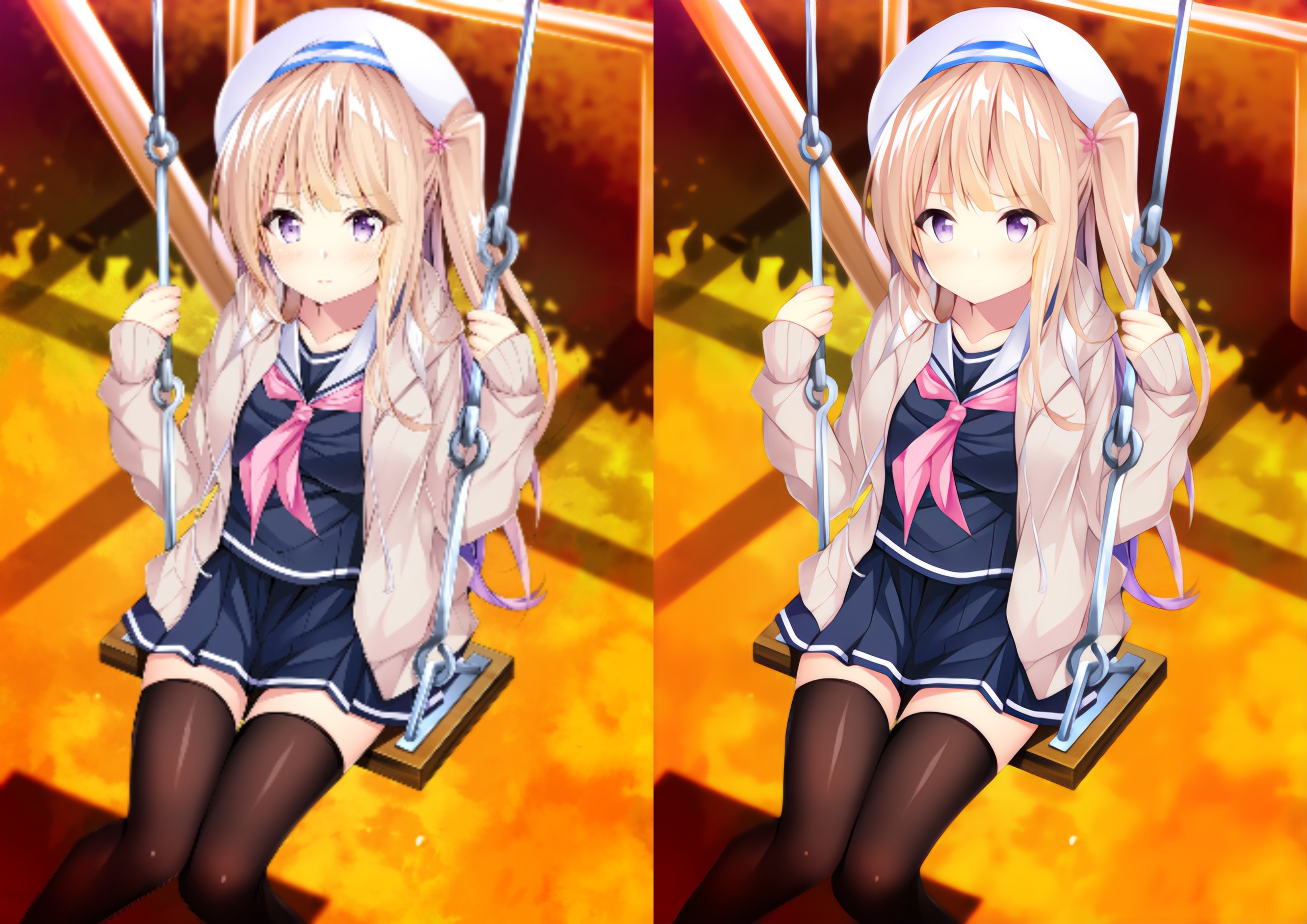
The proof of any super-resolution model is in the results. Below are side-by-side comparisons demonstrating the quality of the upscaling. The comparisons are at the same scale, showing how Lite-ESRGAN preserves and enhances details far beyond simple linear upscaling.
Same-scale comparison: (Left: Linear, Right: Lite-ESRGAN)
- Title: Lite-ESRGAN, High-Quality Super-Resolution for Everyone (Even on Low-VRAM GPUs)
- Author: Fireflies
- Created at : 2022-07-21 15:20:41
- Updated at : 2026-04-02 08:44:38
- Link: https://fireflies3072.github.io/lite-esrgan/
- License: This work is licensed under CC BY-NC-SA 4.0.